Please REGISTER or RENEW your account on RAPiDGATOR.net and support us by doing through all RAPiDGATOR working download links on main posts...
Sept 13

CorelDRAW Graphics Suite 27.2.0

With CorelDRAW you can unleash your creative side. The package offers professional tools for photo editing, vector graphics development, page layout and word processing – in short, everything you need to create stunning projects.
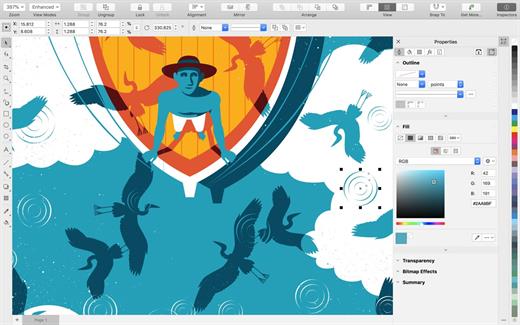

  • VECTOR GRAPHICS | With powerful tools, you can turn the simplest shapes and lines into multifaceted works of art.
  • PAGE MAKETS | Everything you need to create brochures, multi-page documents, and more.
  • TYPOGRAPHY | Customize settings such as font, size, spacing, shadow, outline, etc. Supports variable fonts for online fine-tuning.
  • COLOR AND SPACE | Adjust transparency, fill patterns and gradients, and apply color to fills and outlines.
  • STYLES AND STYLE Sets | Quickly and uniformly format entire documents and multiple objects, and create multiple designs.
  • AI INSTRUMENTS | AI features upsampling and JPEG compression artifact removal; vector and raster effects; high-quality raster-to-vector tracing.
  • COMPATIBILITY WITH FILE FORMATS | Supports CDR, CDT, CPT, DES, AI, PSD, PDF, JPG, PNG, SVG, DWG, DXF, EPS, TIFF, HEIF and more.
  • SIDECAR | Sidecar support on macOS lets you design on iPad with Apple Pencil and see your CorelDRAW changes on your computer screen.
  • TOUCH BAR | Quick access to OS-level controls and CorelDRAW features such as layer settings, text controls, and more.
  • NATIVE SOLUTION FOR macOS | Authentic working environment for Mac users. UI design meets the latest macOS Big Sur standards, including support for M1 processors.

CORELDRAW CAPABILITIES


  • BRANDING AND MARKETING | Our product allows you to develop the brand assets and marketing tools that advertising and printing professionals and small businesses often need to create their own marketing and communication materials.
  • Outdoor Advertising & Wide Format Printing | Print industry professionals rely on CorelDRAW’s high-quality prepress tools and powerful color management module.
  • Apparel and Textiles | Applied design professionals favor CorelDRAW for the tools they need to produce fashion-related products.
  • Retail and eCommerce | Commerce professionals can rely on CorelDRAW Graphics Suite’s specialized web design and print tools for projects ranging from promotional materials to online store assets.
  • FIGURATIVE ART | Artists can boldly combine traditional painting techniques with advanced technology to create stunning works of art.
  • AND MUCH MORE!
What’s New

Version 27.2.0:


  • Release notes were unavailable when this listing was updated.
Compatibility

macOS 10.15 or later
Apple Silicon or Intel Core processor


Release Name: CorelDRAW Graphics Suite 27.2.0
Size: 2.2 GB
Links: HOMEPAGE – NFO – Torrent Search

Download: UPLOADY – RAPiDGATOR

3 Comments
Sept 12

CorelDRAW Graphics Suite 27.2.0

With CorelDRAW you can unleash your creative side. The package offers professional tools for photo editing, vector graphics development, page layout and word processing – in short, everything you need to create stunning projects.


  • VECTOR GRAPHICS | With powerful tools, you can turn the simplest shapes and lines into multifaceted works of art.
  • PAGE MAKETS | Everything you need to create brochures, multi-page documents, and more.
  • TYPOGRAPHY | Customize settings such as font, size, spacing, shadow, outline, etc. Supports variable fonts for online fine-tuning.
  • COLOR AND SPACE | Adjust transparency, fill patterns and gradients, and apply color to fills and outlines.
  • STYLES AND STYLE Sets | Quickly and uniformly format entire documents and multiple objects, and create multiple designs.
  • AI INSTRUMENTS | AI features upsampling and JPEG compression artifact removal; vector and raster effects; high-quality raster-to-vector tracing.
  • COMPATIBILITY WITH FILE FORMATS | Supports CDR, CDT, CPT, DES, AI, PSD, PDF, JPG, PNG, SVG, DWG, DXF, EPS, TIFF, HEIF and more.
  • SIDECAR | Sidecar support on macOS lets you design on iPad with Apple Pencil and see your CorelDRAW changes on your computer screen.
  • TOUCH BAR | Quick access to OS-level controls and CorelDRAW features such as layer settings, text controls, and more.
  • NATIVE SOLUTION FOR macOS | Authentic working environment for Mac users. UI design meets the latest macOS Big Sur standards, including support for M1 processors.

CORELDRAW CAPABILITIES


  • BRANDING AND MARKETING | Our product allows you to develop the brand assets and marketing tools that advertising and printing professionals and small businesses often need to create their own marketing and communication materials.
  • Outdoor Advertising & Wide Format Printing | Print industry professionals rely on CorelDRAW’s high-quality prepress tools and powerful color management module.
  • Apparel and Textiles | Applied design professionals favor CorelDRAW for the tools they need to produce fashion-related products.
  • Retail and eCommerce | Commerce professionals can rely on CorelDRAW Graphics Suite’s specialized web design and print tools for projects ranging from promotional materials to online store assets.
  • FIGURATIVE ART | Artists can boldly combine traditional painting techniques with advanced technology to create stunning works of art.
  • AND MUCH MORE!
What’s New

Version 27.2.0:


  • Release notes were unavailable when this listing was updated.
Compatibility

macOS 10.15 or later
Apple Silicon or Intel Core processor


Release Name: CorelDRAW Graphics Suite 27.2.0
Size: 2.2 GB
Links: HOMEPAGE – NFO – Torrent Search

Download: UPLOADY – RAPiDGATOR
4 Comments
Sept 11

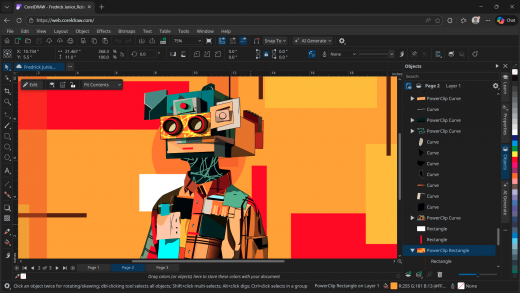
CorelDRAW Graphics Suite 2026 v27.2.0.135

Description: CorelDRAW® Graphics Suite is your fully-loaded, professional design toolkit for delivering breathtaking vector illustration, layout, photo editing, and typography projects with total efficiency. A budget-friendly subscription provides ongoing value with instant access to exclusive apps, features, content, AI credits, and support for the latest technologies.

Vector illustration
Use CorelDRAW's powerful vector illustration tools to turn basic lines and shapes into complex works of art. Create curves with many versatile shaping and drawing tools. Add creative effects to your vector artwork with effect tools like Contour, Envelope, Blend, Mesh Fill, and more.

Page layout
Find all the tools you need to create layouts for brochures, multi-page documents and more. Toggle between single page and multipage editing, giving you creative freedom to work the way you want.

Typography
Arrange type beautifully with a complete set of typography tools. Add effects to text like block shadows and contours. Fine-tune fonts responsively with variable font support, fit text to paths, and more.

Font management
Organize and manage your font library with the intuitive Corel Font Manager, and use your favorite fonts without having to install them. Work faster with fonts using the network storage feature, and enjoy direct access to over 1,700 Google Fonts families.

Photo editing
Adjust color and tone, remove imperfections, correct perspective and more with Corel PHOTO-PAINT's powerful layer-based photo editing tools. Improve the size and quality of your images with artificial intelligence.

Artificial intelligence
Speed up your workflow with powerful AI tools that support creativity at every stage. Create and refine visuals with prompt-based generative image creation and modification, make faster, more accurate edits with AI-assisted image masking, and cleanly isolate subjects using AI background removal.

System Requirements
Windows 11 or Windows 10, 64-bit, with the latest updates
Intel Core i3, i5, i7, i9 (7th generation or newer) or AMD Ryzen 3, 5, 7, 9, Threadripper, EPYC
8 GB RAM (16 GB RAM or higher recommended)
5.5 GB hard disk space for application and installation files
OpenCL 1.2-compatible video card with 3 GB or more of VRAM
1280 x 720 screen resolution at 100% scaling (96 dpi) (1920 x 1080 or higher recommended)
Mouse, tablet or multi-touch screen
CorelDRAW Web - browser requirements
Google Chrome Version 142 or higher
Microsoft Edge Version 142 or higher
Firefox* Version 145 or higher

Release Name: CorelDRAW Graphics Suite 2026 v27.2.0.135
Size: 1.3 GB
Links: HOMEPAGE – NFO – Torrent Search

Download: UPLOADY – RAPiDGATOR
7 Comments
July 13

CorelDRAW Graphics Suite 2026 v27.1.0.129

Description: CorelDRAW® Graphics Suite is your fully-loaded, professional design toolkit for delivering breathtaking vector illustration, layout, photo editing, and typography projects with total efficiency. A budget-friendly subscription provides ongoing value with instant access to exclusive apps, features, content, AI credits, and support for the latest technologies.

Vector illustration
Use CorelDRAW's powerful vector illustration tools to turn basic lines and shapes into complex works of art. Create curves with many versatile shaping and drawing tools. Add creative effects to your vector artwork with effect tools like Contour, Envelope, Blend, Mesh Fill, and more.

Page layout
Find all the tools you need to create layouts for brochures, multi-page documents and more. Toggle between single page and multipage editing, giving you creative freedom to work the way you want.

Typography
Arrange type beautifully with a complete set of typography tools. Add effects to text like block shadows and contours. Fine-tune fonts responsively with variable font support, fit text to paths, and more.

Font management
Organize and manage your font library with the intuitive Corel Font Manager, and use your favorite fonts without having to install them. Work faster with fonts using the network storage feature, and enjoy direct access to over 1,700 Google Fonts families.

Photo editing
Adjust color and tone, remove imperfections, correct perspective and more with Corel PHOTO-PAINT's powerful layer-based photo editing tools. Improve the size and quality of your images with artificial intelligence.

Artificial intelligence
Speed up your workflow with powerful AI tools that support creativity at every stage. Create and refine visuals with prompt-based generative image creation and modification, make faster, more accurate edits with AI-assisted image masking, and cleanly isolate subjects using AI background removal.

System Requirements
Windows 11 or Windows 10, 64-bit, with the latest updates
Intel Core i3, i5, i7, i9 (7th generation or newer) or AMD Ryzen 3, 5, 7, 9, Threadripper, EPYC
8 GB RAM (16 GB RAM or higher recommended)
5.5 GB hard disk space for application and installation files
OpenCL 1.2-compatible video card with 3 GB or more of VRAM
1280 x 720 screen resolution at 100% scaling (96 dpi) (1920 x 1080 or higher recommended)
Mouse, tablet or multi-touch screen
CorelDRAW Web - browser requirements
Google Chrome Version 142 or higher
Microsoft Edge Version 142 or higher
Firefox* Version 145 or higher

Release Name: CorelDRAW Graphics Suite 2026 v27.1.0.129
Size: 1.3 GB
Links: HOMEPAGE – NFO – Torrent Search

Download: RAPiDGATOR

5 Comments
July 8

CorelDRAW Graphics Suite 2026 v27.1.0.129 (x64) + Fix

Description: CorelDRAW® Graphics Suite is your fully-loaded, professional design toolkit for delivering breathtaking vector illustration, layout, photo editing, and typography projects with total efficiency. A budget-friendly subscription provides ongoing value with instant access to exclusive apps, features, content, AI credits, and support for the latest technologies.

Vector illustration
Use CorelDRAW's powerful vector illustration tools to turn basic lines and shapes into complex works of art. Create curves with many versatile shaping and drawing tools. Add creative effects to your vector artwork with effect tools like Contour, Envelope, Blend, Mesh Fill, and more.

Page layout
Find all the tools you need to create layouts for brochures, multi-page documents and more. Toggle between single page and multipage editing, giving you creative freedom to work the way you want.

Typography
Arrange type beautifully with a complete set of typography tools. Add effects to text like block shadows and contours. Fine-tune fonts responsively with variable font support, fit text to paths, and more.

Font management
Organize and manage your font library with the intuitive Corel Font Manager, and use your favorite fonts without having to install them. Work faster with fonts using the network storage feature, and enjoy direct access to over 1,700 Google Fonts families.

Photo editing
Adjust color and tone, remove imperfections, correct perspective and more with Corel PHOTO-PAINT's powerful layer-based photo editing tools. Improve the size and quality of your images with artificial intelligence.

Artificial intelligence
Speed up your workflow with powerful AI tools that support creativity at every stage. Create and refine visuals with prompt-based generative image creation and modification, make faster, more accurate edits with AI-assisted image masking, and cleanly isolate subjects using AI background removal.

System Requirements
Windows 11 or Windows 10, 64-bit, with the latest updates
Intel Core i3, i5, i7, i9 (7th generation or newer) or AMD Ryzen 3, 5, 7, 9, Threadripper, EPYC
8 GB RAM (16 GB RAM or higher recommended)
5.5 GB hard disk space for application and installation files
OpenCL 1.2-compatible video card with 3 GB or more of VRAM
1280 x 720 screen resolution at 100% scaling (96 dpi) (1920 x 1080 or higher recommended)
Mouse, tablet or multi-touch screen
CorelDRAW Web - browser requirements
Google Chrome Version 142 or higher
Microsoft Edge Version 142 or higher
Firefox* Version 145 or higher

Release Name: CorelDRAW Graphics Suite 2026 v27.1.0.129 (x64) + Fix
Size: 1.3 GB
Links: HOMEPAGE – NFO – Torrent Search

Download: RAPiDGATOR

4 Comments
June 17

CorelDRAW Graphics Suite 2026 v27.1.0.25

Description: CorelDRAW® Graphics Suite is your fully-loaded, professional design toolkit for delivering breathtaking vector illustration, layout, photo editing, and typography projects with total efficiency. A budget-friendly subscription provides ongoing value with instant access to exclusive apps, features, content, AI credits, and support for the latest technologies.

Vector illustration
Use CorelDRAW's powerful vector illustration tools to turn basic lines and shapes into complex works of art. Create curves with many versatile shaping and drawing tools. Add creative effects to your vector artwork with effect tools like Contour, Envelope, Blend, Mesh Fill, and more.

Page layout
Find all the tools you need to create layouts for brochures, multi-page documents and more. Toggle between single page and multipage editing, giving you creative freedom to work the way you want.

Typography
Arrange type beautifully with a complete set of typography tools. Add effects to text like block shadows and contours. Fine-tune fonts responsively with variable font support, fit text to paths, and more.

Font management
Organize and manage your font library with the intuitive Corel Font Manager, and use your favorite fonts without having to install them. Work faster with fonts using the network storage feature, and enjoy direct access to over 1,700 Google Fonts families.

Photo editing
Adjust color and tone, remove imperfections, correct perspective and more with Corel PHOTO-PAINT's powerful layer-based photo editing tools. Improve the size and quality of your images with artificial intelligence.

Artificial intelligence
Speed up your workflow with powerful AI tools that support creativity at every stage. Create and refine visuals with prompt-based generative image creation and modification, make faster, more accurate edits with AI-assisted image masking, and cleanly isolate subjects using AI background removal.

System Requirements
Windows 11 or Windows 10, 64-bit, with the latest updates
Intel Core i3, i5, i7, i9 (7th generation or newer) or AMD Ryzen 3, 5, 7, 9, Threadripper, EPYC
8 GB RAM (16 GB RAM or higher recommended)
5.5 GB hard disk space for application and installation files
OpenCL 1.2-compatible video card with 3 GB or more of VRAM
1280 x 720 screen resolution at 100% scaling (96 dpi) (1920 x 1080 or higher recommended)
Mouse, tablet or multi-touch screen
CorelDRAW Web - browser requirements
Google Chrome Version 142 or higher
Microsoft Edge Version 142 or higher
Firefox* Version 145 or higher

Release Name: CorelDRAW Graphics Suite 2026 v27.1.0.25
Size: 1.3 GB
Links: HOMEPAGE – NFO – Torrent Search

Download: RAPiDGATOR

5 Comments
Mar 6

CorelDRAW Graphics Suite 27.0.0.121

CORELDRAW CAPABILITIES


  • BRANDING AND MARKETING | Our product allows you to develop the brand assets and marketing tools that advertising and printing professionals and small businesses often need to create their own marketing and communication materials.
  • Outdoor Advertising & Wide Format Printing | Print industry professionals rely on CorelDRAW’s high-quality prepress tools and powerful color management module.
  • Apparel and Textiles | Applied design professionals favor CorelDRAW for the tools they need to produce fashion-related products.
  • Retail and eCommerce | Commerce professionals can rely on CorelDRAW Graphics Suite’s specialized web design and print tools for projects ranging from promotional materials to online store assets.
  • FIGURATIVE ART | Artists can boldly combine traditional painting techniques with advanced technology to create stunning works of art.
  • AND MUCH MORE!

What’s New

Version 27.0.0.121:


  • Release notes were unavailable when this listing was updated.
Compatibility

macOS 10.15 or later
Apple Silicon or Intel Core processor


Release Name: CorelDRAW Graphics Suite 27.0.0.121
Size: 2.2 GB
Links: HOMEPAGE – NFO – Torrent Search

Download: RAPiDGATOR

8 Comments
Mar 4

CorelDRAW Graphics Suite 2026 v27.0.0.121

Description: CorelDRAW® Graphics Suite is your fully-loaded, professional design toolkit for delivering breathtaking vector illustration, layout, photo editing, and typography projects with total efficiency. A budget-friendly subscription provides ongoing value with instant access to exclusive apps, features, content, AI credits, and support for the latest technologies.

Vector illustration
Use CorelDRAW's powerful vector illustration tools to turn basic lines and shapes into complex works of art. Create curves with many versatile shaping and drawing tools. Add creative effects to your vector artwork with effect tools like Contour, Envelope, Blend, Mesh Fill, and more.

Page layout
Find all the tools you need to create layouts for brochures, multi-page documents and more. Toggle between single page and multipage editing, giving you creative freedom to work the way you want.

Typography
Arrange type beautifully with a complete set of typography tools. Add effects to text like block shadows and contours. Fine-tune fonts responsively with variable font support, fit text to paths, and more.

Font management
Organize and manage your font library with the intuitive Corel Font Manager, and use your favorite fonts without having to install them. Work faster with fonts using the network storage feature, and enjoy direct access to over 1,700 Google Fonts families.

Photo editing
Adjust color and tone, remove imperfections, correct perspective and more with Corel PHOTO-PAINT's powerful layer-based photo editing tools. Improve the size and quality of your images with artificial intelligence.

Artificial intelligence
Speed up your workflow with powerful AI tools that support creativity at every stage. Create and refine visuals with prompt-based generative image creation and modification, make faster, more accurate edits with AI-assisted image masking, and cleanly isolate subjects using AI background removal.

System Requirements
Windows 11 or Windows 10, 64-bit, with the latest updates
Intel Core i3, i5, i7, i9 (7th generation or newer) or AMD Ryzen 3, 5, 7, 9, Threadripper, EPYC
8 GB RAM (16 GB RAM or higher recommended)
5.5 GB hard disk space for application and installation files
OpenCL 1.2-compatible video card with 3 GB or more of VRAM
1280 x 720 screen resolution at 100% scaling (96 dpi) (1920 x 1080 or higher recommended)
Mouse, tablet or multi-touch screen
CorelDRAW Web - browser requirements
Google Chrome Version 142 or higher
Microsoft Edge Version 142 or higher
Firefox* Version 145 or higher

Release Name: CorelDRAW Graphics Suite 2026 v27.0.0.121
Size: 1.3 GB
Links: HOMEPAGE – NFO – Torrent Search

Download: RAPiDGATOR

9 Comments
Aug 30

CorelDRAW Graphics Suite 2025 v26.2.0.170

Description: CorelDRAW® Graphics Suite is your fully-loaded, professional design toolkit for delivering breathtaking vector illustration, layout, photo editing, and typography projects with total efficiency. A budget-friendly subscription provides ongoing value with instant access to exclusive new features and content, and support for the latest technologies.

Vector illustration
Use CorelDRAW's powerful vector illustration tools to turn basic lines and shapes into complex works of art. Create curves with many versatile shaping and drawing tools. Add creative effects to your vector artwork with effect tools like Contour, Envelope, Blend, Mesh Fill, and more.

Page layout
Find all the tools you need to create layouts for brochures, multi-page documents and more. Toggle between single page and multipage editing, giving you creative freedom to work the way you want.

Typography
Arrange type beautifully with a complete set of typography tools. Add effects to text like block shadows and contours. Fine-tune fonts responsively with variable font support, fit text to paths, and more.

Font management
Organize and manage your font library with the intuitive Corel Font Manager, and use your favorite fonts without having to install them. Work faster with fonts using the network storage feature, and enjoy direct access to over 1,700 Google Fonts families.

Photo editing
Adjust color and tone, remove imperfections, correct perspective and more with Corel PHOTO-PAINT's powerful layer-based photo editing tools. Improve the size and quality of your images with artificial intelligence. Use AfterShot HDR to create stunning High Dynamic Range photos from your RAW images.

Non-destructive editing
Edit bitmaps and vectors knowing you won't harm the original image or object. Create block shadows, symmetrical illustrations, and perspective drawings all non-destructively. Apply a number of reversible adjustments and effects in CorelDRAW and Corel PHOTO-PAINT.

Design for print or web
Experience flawless publishing and output—every time. Master color consistency across different media knowing your colors are accurate before you print.
Access Pantone color palettes in CorelDRAW and Corel PHOTO-PAINT—free of charge. With cutting-edge and timeless hues at your fingertips, you can set precise, vibrant color expectations for every project.

Bitmap to vector tracing
Enjoy exceptional bitmap-to-vector trace results with the impressive AI-assisted PowerTRACE™. Benefit from advanced image-optimization options that help improve the quality of a bitmap as you trace it.

System Requirements
Windows 11 (Version 22H2 or later) or Windows 10 (Version 22H2), 64-bit, with the latest updates
Intel Core i3, i5, i7, i9 (7th generation or newer) or AMD Ryzen 3, 5, 7, 9, Threadripper, EPYC
8 GB RAM (16 GB RAM or higher recommended)
5.5 GB hard disk space for application and installation files
OpenCL 1.2-compatible video card with 3 GB or more of VRAM
1280 x 720 screen resolution at 100% scaling (96 dpi) (1920 x 1080 at 150% scaling or higher recommended)
Mouse, tablet or multi-touch screen
CorelDRAW Web - browser requirements
Google Chrome Version 130 or higher
Microsoft Edge Version 130 or higher
Firefox* Version 130 or higher
*Support for Firefox is limited, and some features (such as clipboard) may not work as expected.
For optimal performance, ensure you have the latest device drivers provided by the manufacturer.

Release Name: CorelDRAW Graphics Suite 2025 v26.2.0.170
Size: 1.8 GB
Links: HOMEPAGE – NFO – Torrent Search

Download: UPLOADGiG – RAPiDGATOR

7 Comments
Aug 12

CorelDRAW Graphics Suite 2025 v26.2.0.29

Description: CorelDRAW® Graphics Suite is your fully-loaded, professional design toolkit for delivering breathtaking vector illustration, layout, photo editing, and typography projects with total efficiency. A budget-friendly subscription provides ongoing value with instant access to exclusive new features and content, and support for the latest technologies.

Vector illustration
Use CorelDRAW's powerful vector illustration tools to turn basic lines and shapes into complex works of art. Create curves with many versatile shaping and drawing tools. Add creative effects to your vector artwork with effect tools like Contour, Envelope, Blend, Mesh Fill, and more.

Page layout
Find all the tools you need to create layouts for brochures, multi-page documents and more. Toggle between single page and multipage editing, giving you creative freedom to work the way you want.

Typography
Arrange type beautifully with a complete set of typography tools. Add effects to text like block shadows and contours. Fine-tune fonts responsively with variable font support, fit text to paths, and more.

Font management
Organize and manage your font library with the intuitive Corel Font Manager, and use your favorite fonts without having to install them. Work faster with fonts using the network storage feature, and enjoy direct access to over 1,700 Google Fonts families.

Photo editing
Adjust color and tone, remove imperfections, correct perspective and more with Corel PHOTO-PAINT's powerful layer-based photo editing tools. Improve the size and quality of your images with artificial intelligence. Use AfterShot HDR to create stunning High Dynamic Range photos from your RAW images.

Non-destructive editing
Edit bitmaps and vectors knowing you won't harm the original image or object. Create block shadows, symmetrical illustrations, and perspective drawings all non-destructively. Apply a number of reversible adjustments and effects in CorelDRAW and Corel PHOTO-PAINT.

Design for print or web
Experience flawless publishing and output—every time. Master color consistency across different media knowing your colors are accurate before you print.
Access Pantone color palettes in CorelDRAW and Corel PHOTO-PAINT—free of charge. With cutting-edge and timeless hues at your fingertips, you can set precise, vibrant color expectations for every project.

Bitmap to vector tracing
Enjoy exceptional bitmap-to-vector trace results with the impressive AI-assisted PowerTRACE™. Benefit from advanced image-optimization options that help improve the quality of a bitmap as you trace it.

System Requirements
Windows 11 (Version 22H2 or later) or Windows 10 (Version 22H2), 64-bit, with the latest updates
Intel Core i3, i5, i7, i9 (7th generation or newer) or AMD Ryzen 3, 5, 7, 9, Threadripper, EPYC
8 GB RAM (16 GB RAM or higher recommended)
5.5 GB hard disk space for application and installation files
OpenCL 1.2-compatible video card with 3 GB or more of VRAM
1280 x 720 screen resolution at 100% scaling (96 dpi) (1920 x 1080 at 150% scaling or higher recommended)
Mouse, tablet or multi-touch screen
CorelDRAW Web - browser requirements
Google Chrome Version 130 or higher
Microsoft Edge Version 130 or higher
Firefox* Version 130 or higher
*Support for Firefox is limited, and some features (such as clipboard) may not work as expected.
For optimal performance, ensure you have the latest device drivers provided by the manufacturer.

Release Name: CorelDRAW Graphics Suite 2025 v26.2.0.29
Size: 1.9 GB
Links: HOMEPAGE – NFO – Torrent Search

Download: FiKPER – NiTROFLARE – RAPiDGATOR

8 Comments