

Please REGISTER or RENEW your account on RAPiDGATOR.net and support us by doing through all RAPiDGATOR working download links on main posts...
Oct 5

Duplicate Finder Professional 2026 v422

Description: Finds duplicate pictures and videos. You can choose any folder on your hard drive (or use standard user folders) and our app will deeply analyze contents of selected folders for searching for any duplicates. The most amazing things is that it will take just a few seconds. Files will be compared by the MD5 hashing algorithm, which means that they will be compared by content, not by name. Then, using our convenient user interface you can view duplicates and delete those which you don't need.
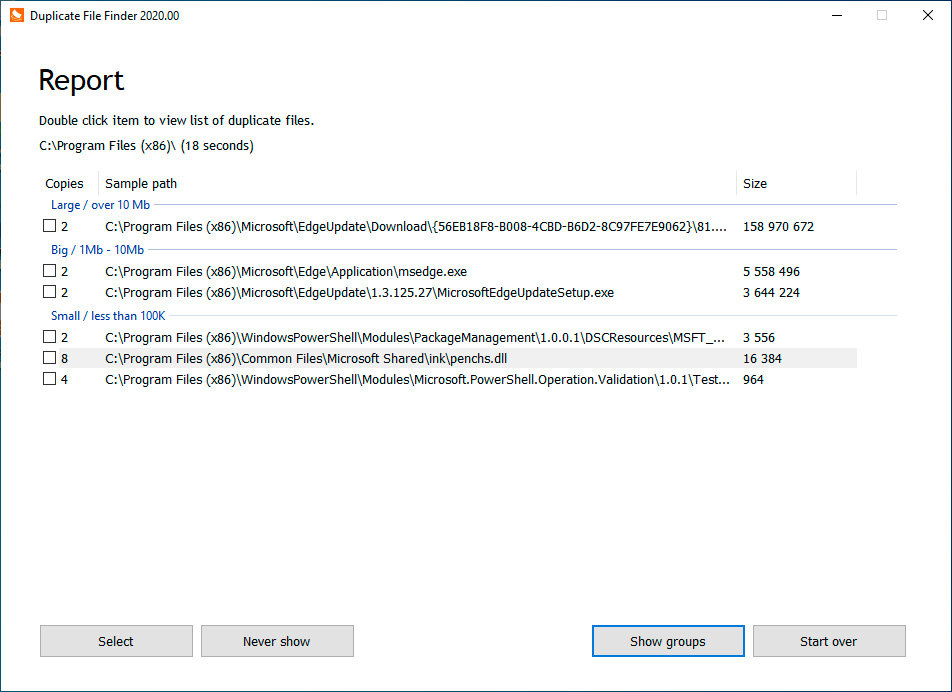
Convenient user interface. Duplicated files can often be quite large, which is why we pay a lot of attention to the user interface. The process starts with splitting the files into groups: large, medium, and small - this feature can be turned off. Then, you can review each duplicate to ensure that you're only deleting the necessary files. You even have the option of viewing selected duplicates through the default viewer or Notepad, or you can open the location on Windows Explorer for other options. If you accidentally delete files into the Recycle Bin, you can recover them with the standard process. Our app can also remember scan results between sessions, so you won't need to rescan repeatedly, saving you time.

Clean your Windows OS. There are a lot of duplicates files created every single day. For instance, on a test computer running Windows 10, we found 23% of duplicated files in the system folder. That 23% was wasting over 1 GB of precious disk space. Just think, every fourth file has a duplicate. Most of these are related to Windows OS update service, which works daily. Some of those files can be safely removed while others cannot; therefore take care when checking the system folders.

Release Name: Duplicate Finder Professional 2026 v422
Size: 3 MB
Links: HOMEPAGE – NFO – Torrent Search

Download: UPLOADY – RAPiDGATOR

9 Comments
Sept 9

Duplicate Finder Professional 2026 v421

Description: Finds duplicate pictures and videos. You can choose any folder on your hard drive (or use standard user folders) and our app will deeply analyze contents of selected folders for searching for any duplicates. The most amazing things is that it will take just a few seconds. Files will be compared by the MD5 hashing algorithm, which means that they will be compared by content, not by name. Then, using our convenient user interface you can view duplicates and delete those which you don't need.

Convenient user interface. Duplicated files can often be quite large, which is why we pay a lot of attention to the user interface. The process starts with splitting the files into groups: large, medium, and small - this feature can be turned off. Then, you can review each duplicate to ensure that you're only deleting the necessary files. You even have the option of viewing selected duplicates through the default viewer or Notepad, or you can open the location on Windows Explorer for other options. If you accidentally delete files into the Recycle Bin, you can recover them with the standard process. Our app can also remember scan results between sessions, so you won't need to rescan repeatedly, saving you time.

Clean your Windows OS. There are a lot of duplicates files created every single day. For instance, on a test computer running Windows 10, we found 23% of duplicated files in the system folder. That 23% was wasting over 1 GB of precious disk space. Just think, every fourth file has a duplicate. Most of these are related to Windows OS update service, which works daily. Some of those files can be safely removed while others cannot; therefore take care when checking the system folders.

Release Name: Duplicate Finder Professional 2026 v421
Size: 3 MB
Links: HOMEPAGE – NFO – Torrent Search

Download: UPLOADY – RAPiDGATOR

5 Comments
June 24

Duplicate Finder Professional 2026 v418

Description: Finds duplicate pictures and videos. You can choose any folder on your hard drive (or use standard user folders) and our app will deeply analyze contents of selected folders for searching for any duplicates. The most amazing things is that it will take just a few seconds. Files will be compared by the MD5 hashing algorithm, which means that they will be compared by content, not by name. Then, using our convenient user interface you can view duplicates and delete those which you don't need.

Convenient user interface. Duplicated files can often be quite large, which is why we pay a lot of attention to the user interface. The process starts with splitting the files into groups: large, medium, and small - this feature can be turned off. Then, you can review each duplicate to ensure that you're only deleting the necessary files. You even have the option of viewing selected duplicates through the default viewer or Notepad, or you can open the location on Windows Explorer for other options. If you accidentally delete files into the Recycle Bin, you can recover them with the standard process. Our app can also remember scan results between sessions, so you won't need to rescan repeatedly, saving you time.

Clean your Windows OS. There are a lot of duplicates files created every single day. For instance, on a test computer running Windows 10, we found 23% of duplicated files in the system folder. That 23% was wasting over 1 GB of precious disk space. Just think, every fourth file has a duplicate. Most of these are related to Windows OS update service, which works daily. Some of those files can be safely removed while others cannot; therefore take care when checking the system folders.

Release Name: Duplicate Finder Professional 2026 v418
Size: 3.1 MB
Links: HOMEPAGE – NFO – Torrent Search

Download: RAPiDGATOR

6 Comments
June 2

Duplicate Finder Professional 2026 v417

Description: Finds duplicate pictures and videos. You can choose any folder on your hard drive (or use standard user folders) and our app will deeply analyze contents of selected folders for searching for any duplicates. The most amazing things is that it will take just a few seconds. Files will be compared by the MD5 hashing algorithm, which means that they will be compared by content, not by name. Then, using our convenient user interface you can view duplicates and delete those which you don't need.

Convenient user interface. Duplicated files can often be quite large, which is why we pay a lot of attention to the user interface. The process starts with splitting the files into groups: large, medium, and small - this feature can be turned off. Then, you can review each duplicate to ensure that you're only deleting the necessary files. You even have the option of viewing selected duplicates through the default viewer or Notepad, or you can open the location on Windows Explorer for other options. If you accidentally delete files into the Recycle Bin, you can recover them with the standard process. Our app can also remember scan results between sessions, so you won't need to rescan repeatedly, saving you time.

Clean your Windows OS. There are a lot of duplicates files created every single day. For instance, on a test computer running Windows 10, we found 23% of duplicated files in the system folder. That 23% was wasting over 1 GB of precious disk space. Just think, every fourth file has a duplicate. Most of these are related to Windows OS update service, which works daily. Some of those files can be safely removed while others cannot; therefore take care when checking the system folders.

Release Name: Duplicate Finder Professional 2026 v417
Size: 3 MB
Links: HOMEPAGE – NFO – Torrent Search

Download: RAPiDGATOR

6 Comments
May 17

Duplicate Finder Professional 2026 v416

Description: Finds duplicate pictures and videos. You can choose any folder on your hard drive (or use standard user folders) and our app will deeply analyze contents of selected folders for searching for any duplicates. The most amazing things is that it will take just a few seconds. Files will be compared by the MD5 hashing algorithm, which means that they will be compared by content, not by name. Then, using our convenient user interface you can view duplicates and delete those which you don't need.

Convenient user interface. Duplicated files can often be quite large, which is why we pay a lot of attention to the user interface. The process starts with splitting the files into groups: large, medium, and small - this feature can be turned off. Then, you can review each duplicate to ensure that you're only deleting the necessary files. You even have the option of viewing selected duplicates through the default viewer or Notepad, or you can open the location on Windows Explorer for other options. If you accidentally delete files into the Recycle Bin, you can recover them with the standard process. Our app can also remember scan results between sessions, so you won't need to rescan repeatedly, saving you time.

Clean your Windows OS. There are a lot of duplicates files created every single day. For instance, on a test computer running Windows 10, we found 23% of duplicated files in the system folder. That 23% was wasting over 1 GB of precious disk space. Just think, every fourth file has a duplicate. Most of these are related to Windows OS update service, which works daily. Some of those files can be safely removed while others cannot; therefore take care when checking the system folders.

Release Name: Duplicate Finder Professional 2026 v416
Size: 2.9 MB
Links: HOMEPAGE – NFO – Torrent Search

Download: RAPiDGATOR

6 Comments
Mar 24

Duplicate Finder Professional 2026 v414 (x64) + Fix

Description: Finds duplicate pictures and videos. You can choose any folder on your hard drive (or use standard user folders) and our app will deeply analyze contents of selected folders for searching for any duplicates. The most amazing things is that it will take just a few seconds. Files will be compared by the MD5 hashing algorithm, which means that they will be compared by content, not by name. Then, using our convenient user interface you can view duplicates and delete those which you don't need.

Convenient user interface. Duplicated files can often be quite large, which is why we pay a lot of attention to the user interface. The process starts with splitting the files into groups: large, medium, and small - this feature can be turned off. Then, you can review each duplicate to ensure that you're only deleting the necessary files. You even have the option of viewing selected duplicates through the default viewer or Notepad, or you can open the location on Windows Explorer for other options. If you accidentally delete files into the Recycle Bin, you can recover them with the standard process. Our app can also remember scan results between sessions, so you won't need to rescan repeatedly, saving you time.

Clean your Windows OS. There are a lot of duplicates files created every single day. For instance, on a test computer running Windows 10, we found 23% of duplicated files in the system folder. That 23% was wasting over 1 GB of precious disk space. Just think, every fourth file has a duplicate. Most of these are related to Windows OS update service, which works daily. Some of those files can be safely removed while others cannot; therefore take care when checking the system folders.

Release Name: Duplicate Finder Professional 2026 v414 (x64) + Fix
Size: 2 MB
Links: HOMEPAGE – NFO – Torrent Search

Download: RAPiDGATOR

7 Comments
Mar 1

Duplicate Finder Professional 2026 v413

Description: Finds duplicate pictures and videos. You can choose any folder on your hard drive (or use standard user folders) and our app will deeply analyze contents of selected folders for searching for any duplicates. The most amazing things is that it will take just a few seconds. Files will be compared by the MD5 hashing algorithm, which means that they will be compared by content, not by name. Then, using our convenient user interface you can view duplicates and delete those which you don't need.

Convenient user interface. Duplicated files can often be quite large, which is why we pay a lot of attention to the user interface. The process starts with splitting the files into groups: large, medium, and small - this feature can be turned off. Then, you can review each duplicate to ensure that you're only deleting the necessary files. You even have the option of viewing selected duplicates through the default viewer or Notepad, or you can open the location on Windows Explorer for other options. If you accidentally delete files into the Recycle Bin, you can recover them with the standard process. Our app can also remember scan results between sessions, so you won't need to rescan repeatedly, saving you time.

Clean your Windows OS. There are a lot of duplicates files created every single day. For instance, on a test computer running Windows 10, we found 23% of duplicated files in the system folder. That 23% was wasting over 1 GB of precious disk space. Just think, every fourth file has a duplicate. Most of these are related to Windows OS update service, which works daily. Some of those files can be safely removed while others cannot; therefore take care when checking the system folders.

Release Name: Duplicate Finder Professional 2026 v413
Size: 2.8 MB
Links: HOMEPAGE – NFO – Torrent Search

Download: RAPiDGATOR

8 Comments
Feb 28

Duplicate Finder Professional 2026 v412

Description: Finds duplicate pictures and videos. You can choose any folder on your hard drive (or use standard user folders) and our app will deeply analyze contents of selected folders for searching for any duplicates. The most amazing things is that it will take just a few seconds. Files will be compared by the MD5 hashing algorithm, which means that they will be compared by content, not by name. Then, using our convenient user interface you can view duplicates and delete those which you don't need.

Convenient user interface. Duplicated files can often be quite large, which is why we pay a lot of attention to the user interface. The process starts with splitting the files into groups: large, medium, and small - this feature can be turned off. Then, you can review each duplicate to ensure that you're only deleting the necessary files. You even have the option of viewing selected duplicates through the default viewer or Notepad, or you can open the location on Windows Explorer for other options. If you accidentally delete files into the Recycle Bin, you can recover them with the standard process. Our app can also remember scan results between sessions, so you won't need to rescan repeatedly, saving you time.

Clean your Windows OS. There are a lot of duplicates files created every single day. For instance, on a test computer running Windows 10, we found 23% of duplicated files in the system folder. That 23% was wasting over 1 GB of precious disk space. Just think, every fourth file has a duplicate. Most of these are related to Windows OS update service, which works daily. Some of those files can be safely removed while others cannot; therefore take care when checking the system folders.

Release Name: Duplicate Finder Professional 2026 v412
Size: 2.8 MB
Links: HOMEPAGE – NFO – Torrent Search

Download: RAPiDGATOR

6 Comments
Feb 25

Duplicate Finder Professional 2026 v411

Description: Finds duplicate pictures and videos. You can choose any folder on your hard drive (or use standard user folders) and our app will deeply analyze contents of selected folders for searching for any duplicates. The most amazing things is that it will take just a few seconds. Files will be compared by the MD5 hashing algorithm, which means that they will be compared by content, not by name. Then, using our convenient user interface you can view duplicates and delete those which you don't need.

Convenient user interface. Duplicated files can often be quite large, which is why we pay a lot of attention to the user interface. The process starts with splitting the files into groups: large, medium, and small - this feature can be turned off. Then, you can review each duplicate to ensure that you're only deleting the necessary files. You even have the option of viewing selected duplicates through the default viewer or Notepad, or you can open the location on Windows Explorer for other options. If you accidentally delete files into the Recycle Bin, you can recover them with the standard process. Our app can also remember scan results between sessions, so you won't need to rescan repeatedly, saving you time.

Clean your Windows OS. There are a lot of duplicates files created every single day. For instance, on a test computer running Windows 10, we found 23% of duplicated files in the system folder. That 23% was wasting over 1 GB of precious disk space. Just think, every fourth file has a duplicate. Most of these are related to Windows OS update service, which works daily. Some of those files can be safely removed while others cannot; therefore take care when checking the system folders.

Release Name: Duplicate Finder Professional 2026 v411
Size: 3 MB
Links: HOMEPAGE – NFO – Torrent Search

Download: RAPiDGATOR

5 Comments
Nov 29

Duplicate Finder Professional 2025 v408

Description: Finds duplicate pictures and videos. You can choose any folder on your hard drive (or use standard user folders) and our app will deeply analyze contents of selected folders for searching for any duplicates. The most amazing things is that it will take just a few seconds. Files will be compared by the MD5 hashing algorithm, which means that they will be compared by content, not by name. Then, using our convenient user interface you can view duplicates and delete those which you don't need.

Convenient user interface. Duplicated files can often be quite large, which is why we pay a lot of attention to the user interface. The process starts with splitting the files into groups: large, medium, and small - this feature can be turned off. Then, you can review each duplicate to ensure that you're only deleting the necessary files. You even have the option of viewing selected duplicates through the default viewer or Notepad, or you can open the location on Windows Explorer for other options. If you accidentally delete files into the Recycle Bin, you can recover them with the standard process. Our app can also remember scan results between sessions, so you won't need to rescan repeatedly, saving you time.

Clean your Windows OS. There are a lot of duplicates files created every single day. For instance, on a test computer running Windows 10, we found 23% of duplicated files in the system folder. That 23% was wasting over 1 GB of precious disk space. Just think, every fourth file has a duplicate. Most of these are related to Windows OS update service, which works daily. Some of those files can be safely removed while others cannot; therefore take care when checking the system folders.

Release Name: Duplicate Finder Professional 2025 v408
Size: 2.3 MB
Links: HOMEPAGE – NFO – Torrent Search

Download: RAPiDGATOR

8 Comments