PopClip 2026.8

PopClip puts Cut, Copy and Paste (and more!) at your fingertips, with a popover menu which appears when you select text.
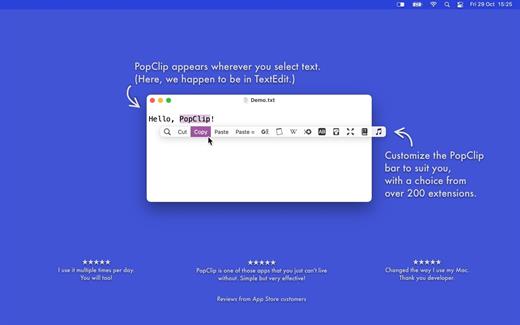
How to use:
- Use your mouse pointer to select some text
- PopClip appears!
Features
- Beautifully rendered user interface looks great on your display
- Instantly search the web for the text you select
- Open web links with one click
- Get dictionary definitions and spelling corrections.
- Adjust the size of the popover, from small to very large
- Small, fast and convenient, PopClip is a great way to work with text.
- A function key (F1, F2 …) can now be used on its own as the keyboard shortcut to show PopClip.
- The “View Source” command now opens a source viewer window with “Export…” and “Copy Snippet” buttons.
- Per-action settings menus now have an “Extension ▶” submenu, giving easier access to commands like View Source.
- Clicking the spinner while an action is running now shows a “Cancelled” indicator if it cancels the action.
- When an AppleScript action fails because automation permission has previously been denied, PopClip now shows an alert explaining how to fix it.
- Added Swedish localization.
macOS 13.5 or later
Release Name: PopClip 2026.8
Size: 8.3 MB
Links: HOMEPAGE – NFO – Torrent Search
Download: RAPiDGATOR