Please REGISTER or RENEW your account on RAPiDGATOR.net and support us by doing through all RAPiDGATOR working download links on main posts...

PopClip puts Cut, Copy and Paste (and more!) at your fingertips, with a popover menu which appears when you select text.
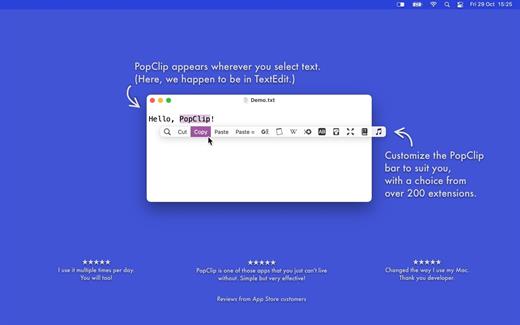
How to use:
- Use your mouse pointer to select some text
- PopClip appears!
Features
- Beautifully rendered user interface looks great on your display
- Instantly search the web for the text you select
- Open web links with one click
- Get dictionary definitions and spelling corrections.
- Adjust the size of the popover, from small to very large
- Small, fast and convenient, PopClip is a great way to work with text.
What’s New Version 2026.8.1:
Fixed
- Fixed a repeating “Keychain Error” alert after the Mac had been left with its screen locked for a while.
- Fixed PopClip appearing prematurely during double- or triple-click-and-hold text selection.
- Fixed actions not being flashed in the settings list on reinstall when in subfolders.
- Reduced memory consumption.
- Other bug fixes.
Compatibility macOS 13.5 or later
Release Name: PopClip 2026.8.1
Size: 8.4 MB
Links: HOMEPAGE – NFO – Torrent Search
Download: UPLOADY – RAPiDGATOR
PopClip puts Cut, Copy and Paste (and more!) at your fingertips, with a popover menu which appears when you select text.
How to use:
- Use your mouse pointer to select some text
- PopClip appears!
Features
- Beautifully rendered user interface looks great on your display
- Instantly search the web for the text you select
- Open web links with one click
- Get dictionary definitions and spelling corrections.
- Adjust the size of the popover, from small to very large
- Small, fast and convenient, PopClip is a great way to work with text.
New
- A function key (F1, F2 …) can now be used on its own as the keyboard shortcut to show PopClip.
- The “View Source” command now opens a source viewer window with “Export…” and “Copy Snippet” buttons.
- Per-action settings menus now have an “Extension ▶” submenu, giving easier access to commands like View Source.
- Clicking the spinner while an action is running now shows a “Cancelled” indicator if it cancels the action.
- When an AppleScript action fails because automation permission has previously been denied, PopClip now shows an alert explaining how to fix it.
- Added Swedish localization.
Compatibility macOS 13.5 or later
Release Name: PopClip 2026.8
Size: 8.3 MB
Links: HOMEPAGE – NFO – Torrent Search
Download: RAPiDGATOR

PopClip puts Cut, Copy and Paste (and more!) at your fingertips, with a popover menu which appears when you select text.
How to use:
- Use your mouse pointer to select some text
- PopClip appears!
Features
- Beautifully rendered user interface looks great on your display
- Instantly search the web for the text you select
- Open web links with one click
- Get dictionary definitions and spelling corrections.
- Adjust the size of the popover, from small to very large
- Small, fast and convenient, PopClip is a great way to work with text.
What’s New Version 2024.12:
- Fixed some situations where PopClip would fail to appear when selecting text.
- Pressing ⌘C sometimes had no effect when pressed simultaneously with PopClip appearing.
- The Open URL action now supports the lt: (LiquidText) URL scheme.
Compatibility macOS 10.15.7 or later.
Apple Silicon or Intel Core processor
Release Name: PopClip 2024.12
Size: 6.9 MB
Links: HOMEPAGE – NFO – Torrent Search
Download: FiKPER – NiTROFLARE – RAPiDGATOR
PopClip puts Cut, Copy and Paste (and more!) at your fingertips, with a popover menu which appears when you select text.
How to use:
- Use your mouse pointer to select some text
- PopClip appears!
Features
- Beautifully rendered user interface looks great on your display
- Instantly search the web for the text you select
- Open web links with one click
- Get dictionary definitions and spelling corrections.
- Adjust the size of the popover, from small to very large
- Small, fast and convenient, PopClip is a great way to work with text.
What’s New Version 2023.9:
- Added: Improved link detection. PopClip now detects links in text without an
http:// or https:// prefix for all the newer top-level domains, e.g. .shop, .news, .coffee. - Added: In Arc browser, extensions now get the page URL and title.
- Added: Basic support for Waterfox browser.
- Changed: The menu bar icon is a little bit smaller.
- Changed: The minimum system requirement is now macOS 10.15 Catalina.
- Fixed: Appears more consistently when selecting text in particular apps, including Obsidian, VS Code, Notion, Ulysses and others.
- Fixed: Various bug fixes. Gotta squash ‘em all.
Compatibility macOS 10.13.6 or later.
Apple Silicon or Intel Core processor
Release Name: PopClip 2023.9
Size: 9.6 MB
Links: HOMEPAGE – NFO – Torrent Search
Download: FiKPER – UPLOADGiG – NiTROFLARE – RAPiDGATOR

PopClip puts Cut, Copy and Paste (and more!) at your fingertips, with a popover menu which appears when you select text.
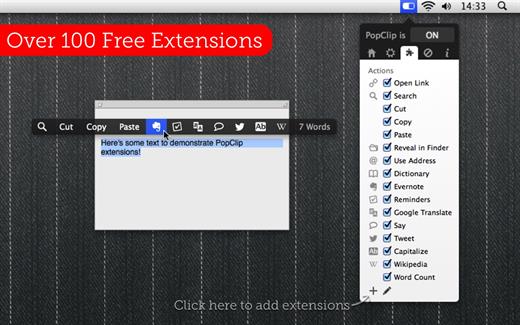
How to use:
- Use your mouse pointer to select some text
- PopClip appears!
Features
- Beautifully rendered user interface looks great on your display
- Instantly search the web for the text you select
- Open web links with one click
- Get dictionary definitions and spelling corrections.
- Adjust the size of the popover, from small to very large
- Small, fast and convenient, PopClip is a great way to work with text.
What’s New Version 2022.12:
- Improved compatibility with Google Docs, 1Password 8, PDF Expert 3 and Xcode 14.
- New features for snippet creators and extension developers.
- Bug fixes.
Compatibility macOS 10.13.6 or later.
Apple Silicon or Intel Core processor
Release Name: PopClip 2022.12
Size: 6.4 MB
Links: HOMEPAGE – NFO – Torrent Search
Download: UPLOADGiG – NiTROFLARE – RAPiDGATOR
PopClip puts Cut, Copy and Paste (and more!) at your fingertips, with a popover menu which appears when you select text.
How to use:
- Use your mouse pointer to select some text
- PopClip appears!
Features
- Beautifully rendered user interface looks great on your display
- Instantly search the web for the text you select
- Open web links with one click
- Get dictionary definitions and spelling corrections.
- Adjust the size of the popover, from small to very large
- Small, fast and convenient, PopClip is a great way to work with text.
What’s New Version 2022.12:
- Improved compatibility with Google Docs, 1Password 8, PDF Expert 3 and Xcode 14.
- New features for snippet creators and extension developers.
- Bug fixes.
Compatibility macOS 10.13.6 or later.
Apple Silicon or Intel Core processor
Release Name: PopClip 2022.12
Size: 6.4 MB
Links: HOMEPAGE – NFO – Torrent Search
Download: UPLOADGiG – NiTROFLARE – RAPiDGATOR



